Readers
Subscribers
View and manage all readers who have an active or past subscription.
The Subscribers page shows every reader who has subscribed to one of your plans.
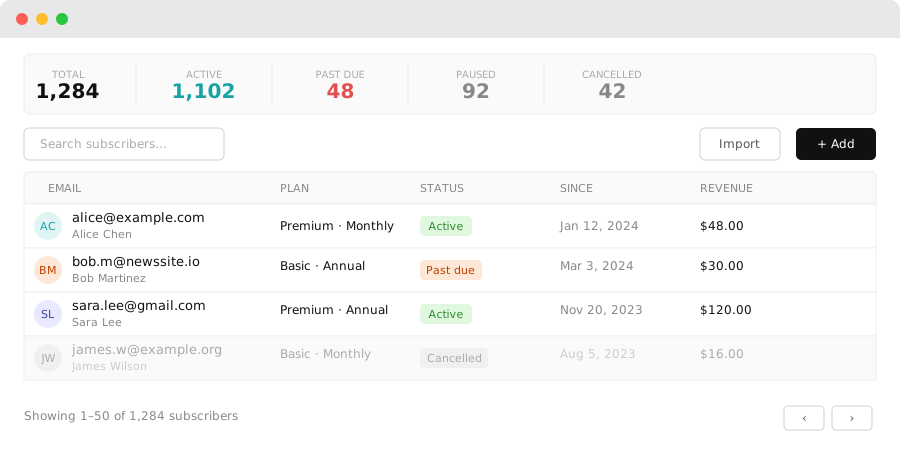
Subscriber list
Go to Dashboard → Subscribers to see all subscribers. The list shows:
- Email — the subscriber's email address
- Plan — which subscription plan they're on
- Status — active, paused, or cancelled
- Started — when the subscription began
- Next billing date — when their next payment is due
Filtering and searching
Use the search bar to find a subscriber by email. Filter by status (active, paused, cancelled) or by plan.
Subscriber actions
Click any subscriber row to open their details. You can:
- Pause — suspend billing temporarily (the subscriber retains access until the current period ends)
- Cancel — cancel the subscription at the end of the current billing period
- Cancel immediately — revoke access now and stop billing
- Reactivate — resume a paused or cancelled subscription
Bulk operations
Select multiple subscribers using the checkboxes and apply bulk actions:
- Export CSV — download the selected subscribers as a CSV file
- Cancel — cancel selected subscriptions in bulk
Subscription lifecycle
Active → Paused → Reactivated
      ↓
   Cancelled (end of period)
      ↓
   Expired
Cancelled subscribers retain access until their current billing period ends. After that, they see the gate again.